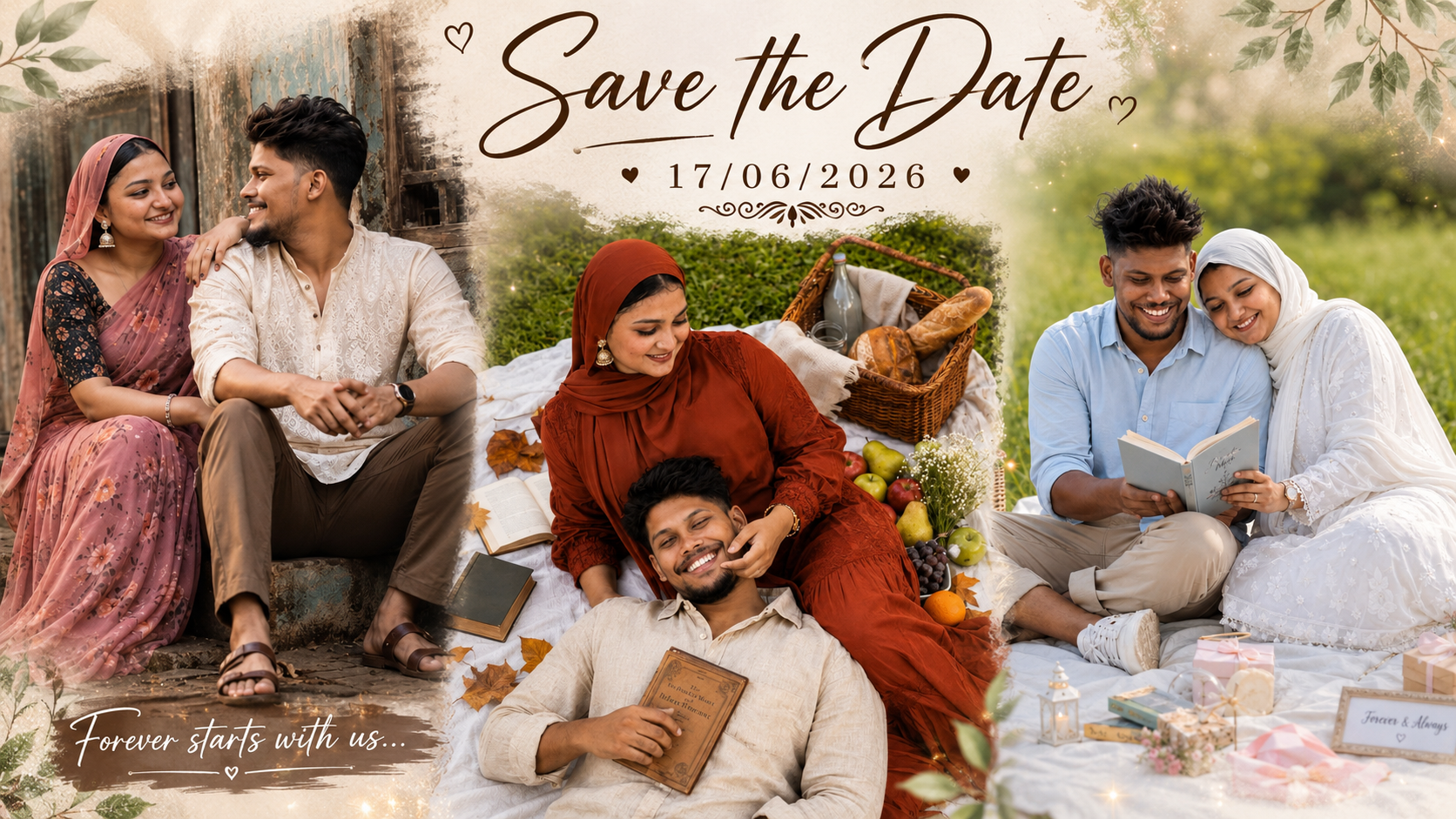
Hello friends, today we are going to try something useful with a topic every engaged couple struggles with at some point. You want a Save The Date that looks stylish and personal, but you do not want to spend long nights fighting with design software or paying a big design fee. On top of that, trends move fast and it is hard to know what actually looks current.
This guide will help you create trending Save The Date photos using only your phone or laptop, plus a few free or low cost apps. You will see concrete examples, simple workflows, and small details that make a big difference in print quality and social media sharing. The goal is to go from random selfie to clean wedding ready design.
The ideas here work for different styles: romantic, minimal, quirky, or full Bollywood style drama. If you are a couple planning your first photo shoot, a friend helping with designs, or a creator who sells templates and wants to stay updated, you will find specific layouts and app recommendations you can apply right away.
Many readers also search for online tools that can add text, filters, and frames without demanding advanced design skills. Wherever apps or websites are mentioned, you will see realistic pros and cons, not just praise, so you can pick a method that suits your device, internet speed, and budget, and still match the current Save The Date trends.
Related Resource
The PROMPT LINK button above opens the related resource for Trending Save The Date Photo Making Ideas. It is included so readers can reach the mentioned page directly.
1. Plan your Save The Date story before you open any app
Most messy Save The Date designs fail before editing even starts, simply because the couple has no clear story. Spend ten minutes deciding what you want the photo to say. Is it about the city where you met, your shared hobby, or a classic romantic moment like walking hand in hand on a beach.
Write down three things: location idea, clothing style, and mood words such as playful, elegant or cinematic. This short list will guide your background choice, posing, fonts, and color grading so the final design feels intentional instead of random.
2. Trending Save The Date photo making ideas you can copy
2.1 Minimal white border portrait
This look is very popular on Instagram and prints well for fridge magnets. Take a clean daylight portrait of you both side by side or in a gentle pose. Keep the background simple, such as a plain wall, curtain, or one color door. In editing, crop it vertically and add a white border on all sides with the text placed at the bottom.
Use a soft serif font for names and a simple sans serif for the date. Avoid too many colors, two shades are enough, often black and one accent that matches your outfit or flowers.
2.2 Candid collage grid
Instead of one formal shot, use three or four small candid photos in a grid. One laughing shot, one walking away, one close up of hands with rings, and one wide scene. Many couples like this for WhatsApp broadcast images and Instagram stories because it feels more natural and less stiff.
Keep the background colors similar so the collage does not look noisy. Place the wedding date in the center or in a thin strip at the bottom. This style works well with pastel color overlays such as soft peach or sage green.
2.3 Location highlight with big date text
If your wedding or engagement has a strong location story, use one large landscape photo of that place with you very small in the frame. Think of a hill station, city skyline, or family home. Then overlay a big, bold date in the center of the sky or empty wall area.
For this idea, check that any important building or religious symbol is not covered by text, and that you have permission to shoot in that area if it is private property.
2.4 Vintage film style with grain
Film style edits with warm tones and light grain are trending across wedding content. Shoot your photo in soft natural light, for example sunset or near a window with thin curtains. Later apply a film preset, reduce contrast slightly, and add a small amount of grain.
Keep the Save The Date text small, placed like a cinema subtitle at the bottom. Too many stickers will break the vintage mood, so let the tones and grain do the main work.
3. Simple apps and tools that work well for Save The Date designs
Many apps can add text and design elements to your photos. The table below compares a few common options. Features and pricing can change by region or over time, so always check the latest details in your app store.
| App or Tool | Best For | Key Strength | Possible Drawback |
|---|---|---|---|
| Canva | Beginners and template lovers | Many ready Save The Date layouts, easy text tools | Free version has some locked fonts and elements |
| PicsArt | Creative phone edits | Strong filters, stickers, brushes for cinematic looks | Ads and occasional heavy processing on older phones |
| Lightroom Mobile | Color grading and film style tones | Precise control of exposure and color for print quality | Text tools are limited, needs pairing with another app |
| Snapseed | Free quick base editing | Good for tuning, selective brightness, healing spots | Typography options are quite basic |
| Fotor or similar web editors | Laptop users | Works in browser, offers templates and fonts | Needs stable internet and may compress images |
4. Step by step workflow for a clean Save The Date photo
4.1 Capture a strong base photo
- Use rear camera instead of selfie camera for better detail.
- Shoot in bright but soft light, avoid harsh midday sun.
- Leave empty space for text, for example keep sky or wall above your heads.
- Take both vertical and horizontal versions so you can design for stories and prints.
4.2 Do basic clean up first
Use Snapseed or Lightroom Mobile to fix exposure, white balance, and crop. Remove small distractions such as random people in the background or dust spots. Do not rush this step, a clean base photo saves time later and avoids over editing inside design apps.
4.3 Add design and text
Open the edited photo in Canva or a similar app. Choose a template that matches your vibe, then replace the sample image and text. Change fonts to match each other, no more than two font styles in one card. Add details in this simple order: names, Save The Date line, event date, city, optional short note like formal invite to follow.
4.4 Export safely for print and social
Save one high resolution copy for print, usually as PNG or high quality JPG. Then export a separate version in lower size for WhatsApp or social platforms so sharing is fast. Some apps automatically compress strongly, so if the image looks soft, try exporting with higher quality settings or from a desktop version.
5. Real world examples and a mini case study
Example 1: Beach couple going for minimal style
A couple shoots on a small local beach with soft morning light. They take a simple walking shot with the sea and sky behind them. Later they use Lightroom Mobile for warm tones and light vignette, then open the image in Canva and place elegant serif text at the bottom center. The final card has one accent color taken from the sea, which makes the design feel coherent and peaceful.
Example 2: Home rooftop collage for budget conscious couples
Another couple uses their building rooftop with fairy lights and a tripod phone stand. They capture a mix of portraits, hand shots with rings, and a wide angle city view. In PicsArt they place four images in a grid, add a soft beige background, and type Save The Date in a handwritten font. The card feels intimate and personal without needing a paid studio shoot.
Mini case study: Fixing a cluttered Save The Date design
Common problem: the couple starts with a busy market background, adds heavy bokeh filters, multiple stickers, three font styles, and bright red text. The result looks noisy and outdated, and printing test copies reveals pixelation and color issues.
Fix approach: first, they recrop the original photo to focus on their faces and remove most of the market signboards. Next, they reduce filter strength by half and remove all but one sticker. They switch to a white border layout with black text, using only one decorative font for their names and a simple font for the date. Finally, they export at higher resolution for print and a separate reduced version for online. The new card looks modern and much easier to read.
6. Common mistakes to avoid with Save The Date photos
- Using low resolution screenshots from social media instead of original photos, which leads to blurry prints.
- Placing text across faces or important details, especially the engagement ring.
- Choosing overly trendy fonts that are hard to read, especially on small phone screens.
- Ignoring color consistency, for example neon text on a soft pastel background.
- Sharing final designs with full personal details in public groups without checking privacy settings.
Conclusion
If you plan your story, pick a clean base photo, and keep the design simple, you can create stylish Save The Date visuals with just your phone. Trends right now favor minimal borders, film style tones, and candid collages, but the key is readability and print safe quality rather than copies of viral posts.
Start with one of the ideas in this guide, test two or three versions with friends, and only then order prints or share widely. A little attention to resolution, font choice, and clutter removal will help your Save The Date look professional, personal, and ready for both WhatsApp and fridge doors.
FAQ
What is the best size for a Save The Date photo card?
For print, common postcard sizes are around 4 by 6 inches or 5 by 7 inches. In apps, create files around 1200 by 1800 pixels or higher so printers have enough detail.
Can I use only a digital Save The Date and skip printing?
Yes, many couples now send only digital cards through WhatsApp, email, or Instagram. Just keep file size light enough for quick sharing while still staying clear on full screen.
Which file format should I use for printing?
High quality JPG or PNG works for most local print shops. For large posters or advanced printers, they may ask for PDF, so always confirm their preference before exporting.
Is it safe to use free templates from apps?
Free templates are usually fine if you use official app stores and respect the app license terms. Avoid downloading cracked or suspicious design packs from unknown sites.
How early should I send a Save The Date?
For local weddings, three to four months before the event is common. For destination weddings or guests who travel internationally, six to eight months gives people time to plan.
Thank you for reading this guide. If you found it helpful, follow the blog for more practical tips on tech, creative apps, AI tools, and the latest digital trends that can make your planning easier.








